Tourline by Clearline.
Drop in the listing photos, take three of yourself, and get back a narrated walkthrough — script written from your own pictures, you presenting it, your licence on the end card.
For agents who list often and do not have a videographer on call. Photograph the house on your phone or use the shots you already sent the MLS, type the address, and Tourline reads those photographs, writes the script room by room for you to edit, and builds a walkthrough video: a presenter on camera — you, built from three photographs you take on the spot, or one of ours — or a voice you pick reading the script over the photos. Wide for the listing page or vertical for Reels, your brokerage and licence on the end card, and Fair Housing wording checked before a single second renders.
Three things, and two of them you already have.
There is no shot list, no storyboard, no upload spec. If you have the photos you sent to the MLS and you can type an address, you have everything Tourline needs. Your own photo is optional and takes about fifteen seconds.
The photos
Drag in the ones you already took, or tap the button on your phone and shoot them on the spot — the file picker opens the camera. JPEG, PNG, WEBP or HEIC straight off an iPhone, up to 15 MB each, as many as the house needs.
- Drag to reorder, so the tour walks the house the way a buyer would
- Label a shot “Kitchen” or “Back yard” and the label rides with it
- Star the ones that deserve real camera movement
- Remove one and the tour renumbers itself
The address
Type it once. Tourline looks the property up and fills in beds, baths, square footage and year built — then asks you to confirm every number before it can appear on screen.
- Nothing is shown that you have not signed off on
- Override any figure; you are the listing agent, not the data vendor
- Add an optional one-line headline for the title card
- The headline is checked for Fair Housing language as you type
Your photo & licence
Filled in once, carried by every video after that. Take the headshot with your phone’s front camera right there in the app, or pick a file — it becomes the circle above your name on the end card.
- Name as licensed, licence number, state, brokerage, office city
- Choose whether the licence number shows — states differ
- Equal Housing Opportunity line on or off
- Leave the photo off and the card is clean text
The listing that gets a video gets the clicks. The listing that waits a week for a videographer gets the price cut.
Video only for the expensive listings
A videographer is several hundred dollars and three days. At a credit a video, the $240,000 bungalow gets the same treatment as the waterfront.
The end card you forgot
Licence number, brokerage, equal-housing line — Tourline builds it from your profile every time, with your headshot on it, so the compliant version is the only version that exists.
The sentence that becomes a complaint
Your headline is checked for Fair Housing problem wording before anything renders. "Perfect for a young family" gets flagged, with a plain explanation and a better line to use.
Everything it does, in the order you will use it.
Tourline does one job for one kind of business. Nothing here needs a manual, and nothing is bolted on for a feature list.
It writes the script from your photographs
Press one button. Tourline looks at the photographs you actually uploaded — not the address, the pictures — together with the facts you confirmed, and writes an opening line, a line for every room and a closing line. Each one is a text box: rewrite any of them, or all of them, or start from nothing and write it yourself. The whole script is checked against the Fair Housing phrase list before it will save, and checked again before a single second renders, so nothing reaches a buyer’s ear that was not checked. Then it is read aloud in the voice you chose, and each shot is held long enough to finish its sentence.
Photos from wherever they are
Drag in a folder from the desktop or tap once on a phone and shoot them on the spot — the picker opens the camera. Reorder by dragging, label rooms, remove the bad one, and the tour renumbers itself.
You, presenting it
Three photographs of yourself, taken in the app, become a figure of you in the outfit you chose — real estate, business, studio, coastal linen, formal, or what you had on. You approve the still before anything is animated, then it speaks your opening line in the voice you picked. Or use Avery, Rosa or Dell instead.
Your headshot on every video
Take it with the front camera inside the app, or upload a file. It becomes the circle above your name on the end card — set once, carried by every video after that, and removable in one tap.
Address to confirmed facts
Type the address and Tourline looks up beds, baths, square footage and year built. Nothing reaches the screen until you confirm it, because a wrong square footage on marketing is your problem, not a data vendor’s.
Four templates from the same photos
Classic walkthrough, Quick tour, Social vertical for Reels and TikTok, Slow luxury. Render the wide cut for the MLS and the vertical for Instagram from one set of photos.
You pick which shots move
Star a photo and it gets real AI camera motion through the room. Everything else gets a smooth pan. One credit either way, so the only question is how you want it to look.
Credits, plans and a ledger you can read
Buy one video, a five-pack or a monthly plan on a card through Stripe. Every credit granted, spent and refunded is a line with a date on it, so the balance is never a number you have to take on trust.
What you actually see, step by step.
These are captures of the real thing, not drawings of it. Eight steps before you sign in — you configure the whole video and watch one made the same way before you are told the price. Every choice you can make is on one of these.
-
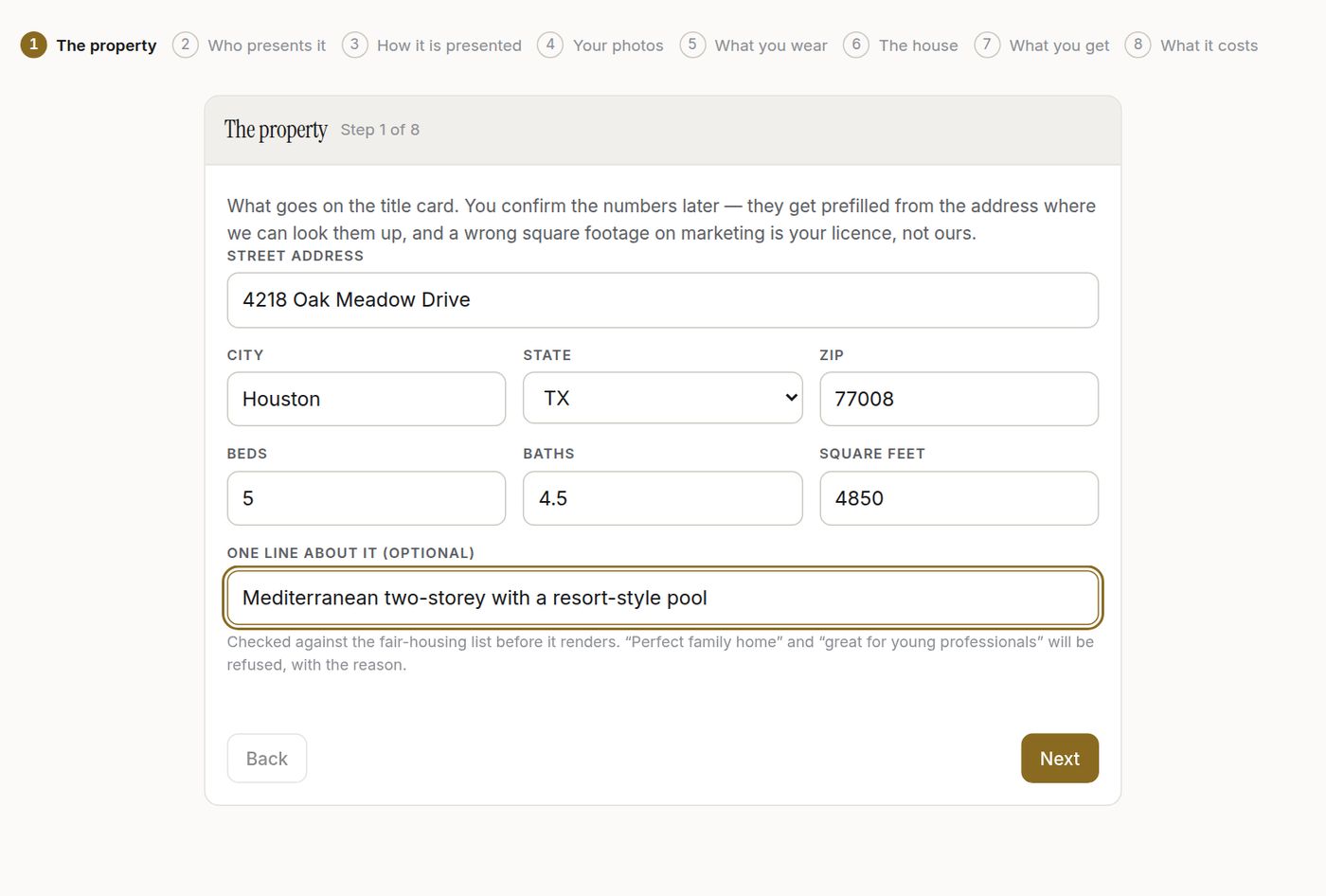
01The property Address, beds, baths, square feet, and one optional line for the title card. The line is checked against the fair-housing list before anything renders.
- Street, city, state, ZIP
- Beds, baths, square feet
- A headline, optional
-
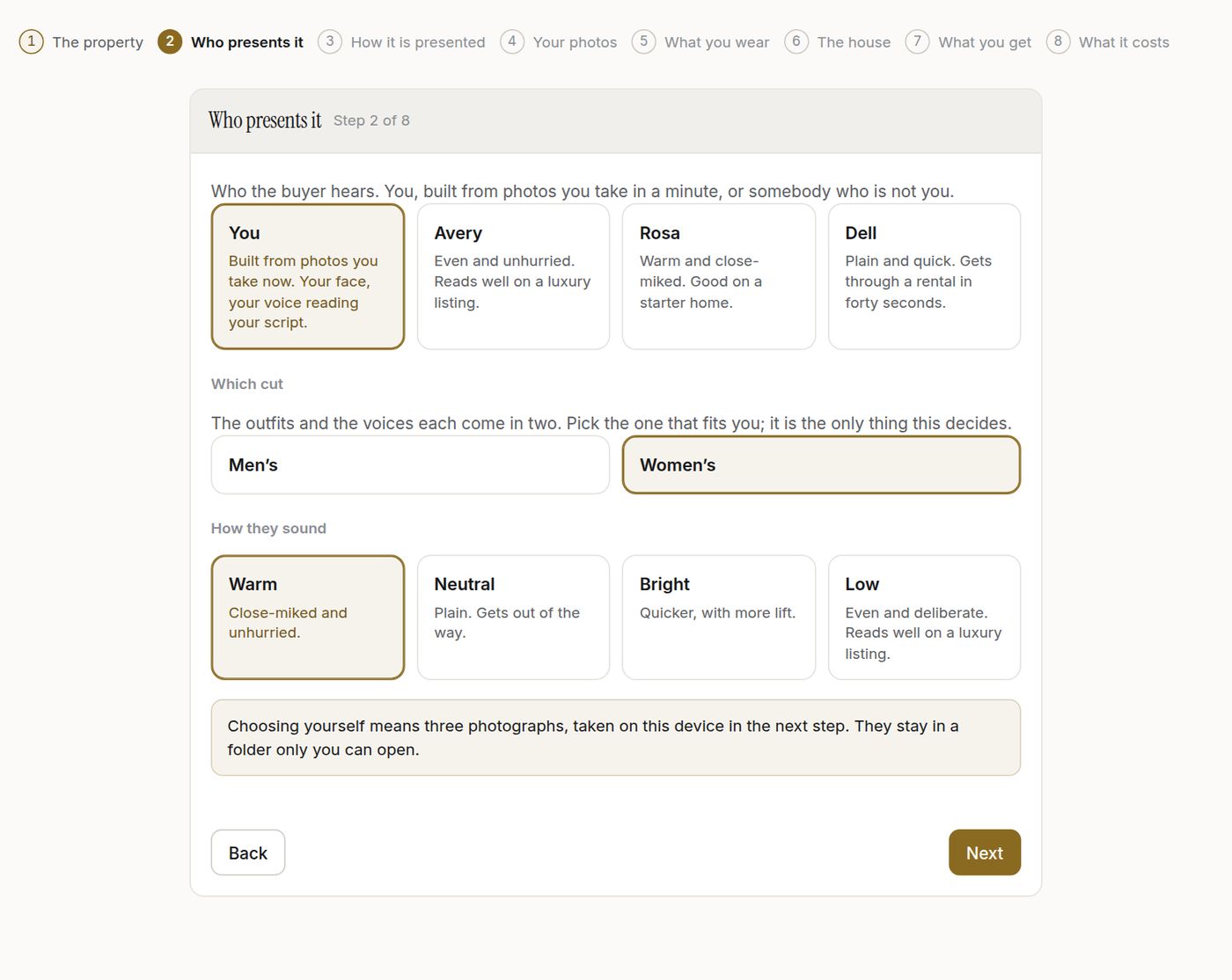
02Who presents it You, built from three photographs you take in the next step — or Avery, Rosa or Dell, who are not you. Then the cut, because every outfit and every voice comes in two. Then how they sound. (For Voice only this step is just the voice: a man’s or a woman’s, and which of the four.)
- You, or a stock presenter
- Men’s or women’s cut
- Warm, Neutral, Bright or Low
-
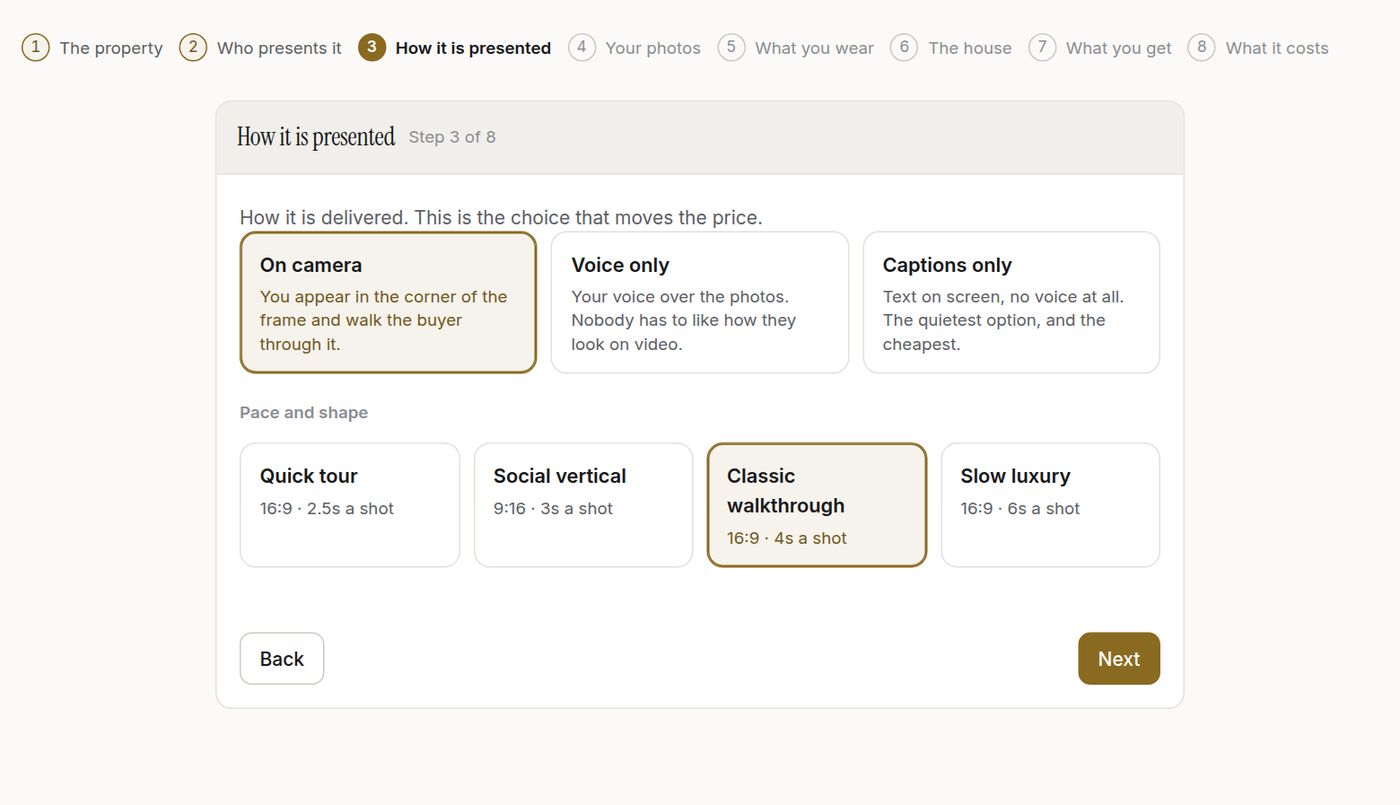
03How it is presented On camera puts the presenter in the corner of the frame and they speak the opening line. Voice only reads the whole script aloud over the photographs, nobody on screen. Captions only is text on screen and no voice at all. All three cost the same, one credit. Then the pace and shape of the video.
- On camera / Voice only / Captions only
- Quick tour, Social vertical, Classic, Slow luxury
-
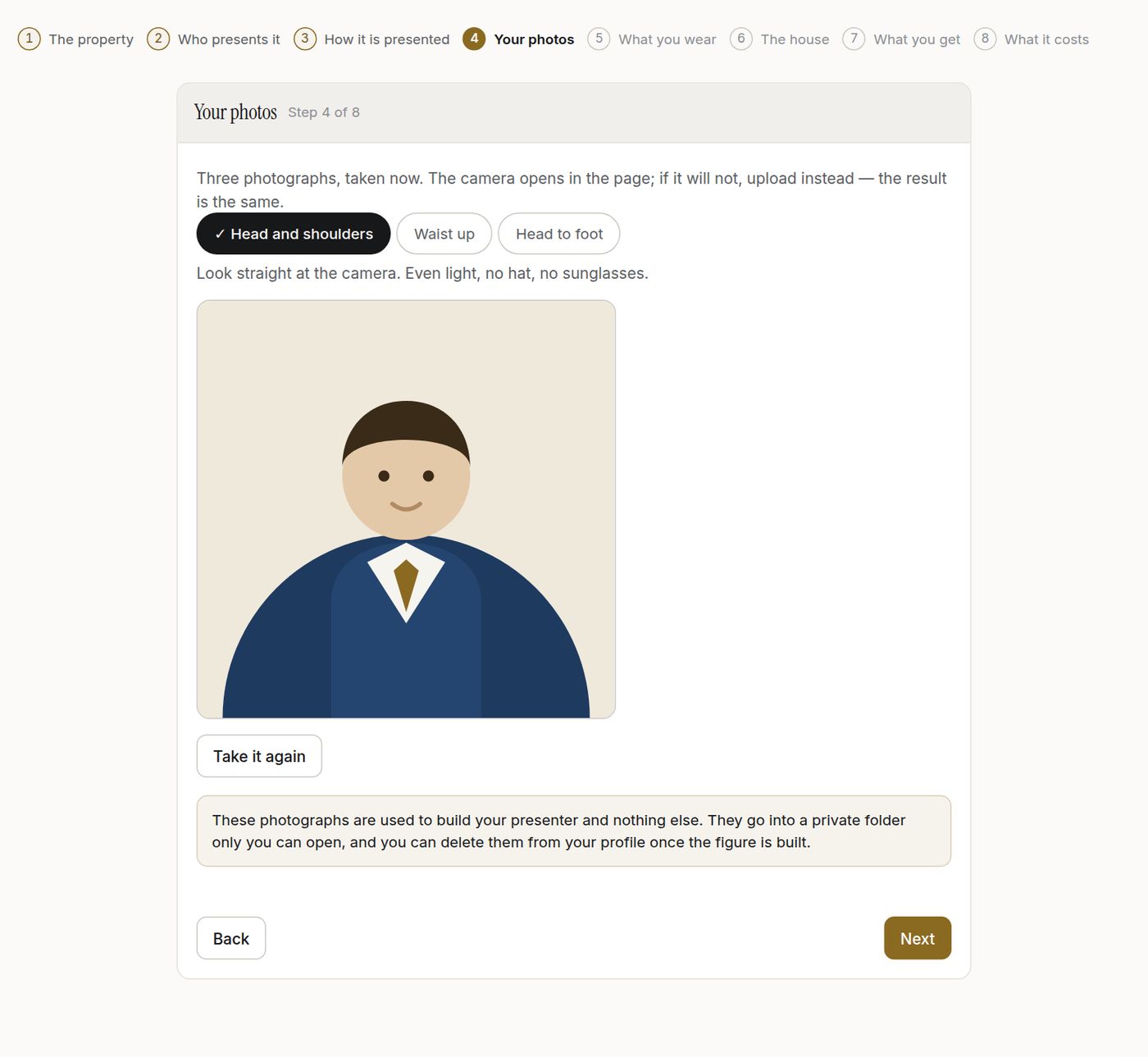
04Your photos Head and shoulders, waist up, head to foot. The camera opens in the page; upload instead if it will not. They go into a folder only you can open and you can delete them once the figure is built.
- Three angles, taken on the spot
- Retake any of them
- Private to you
-
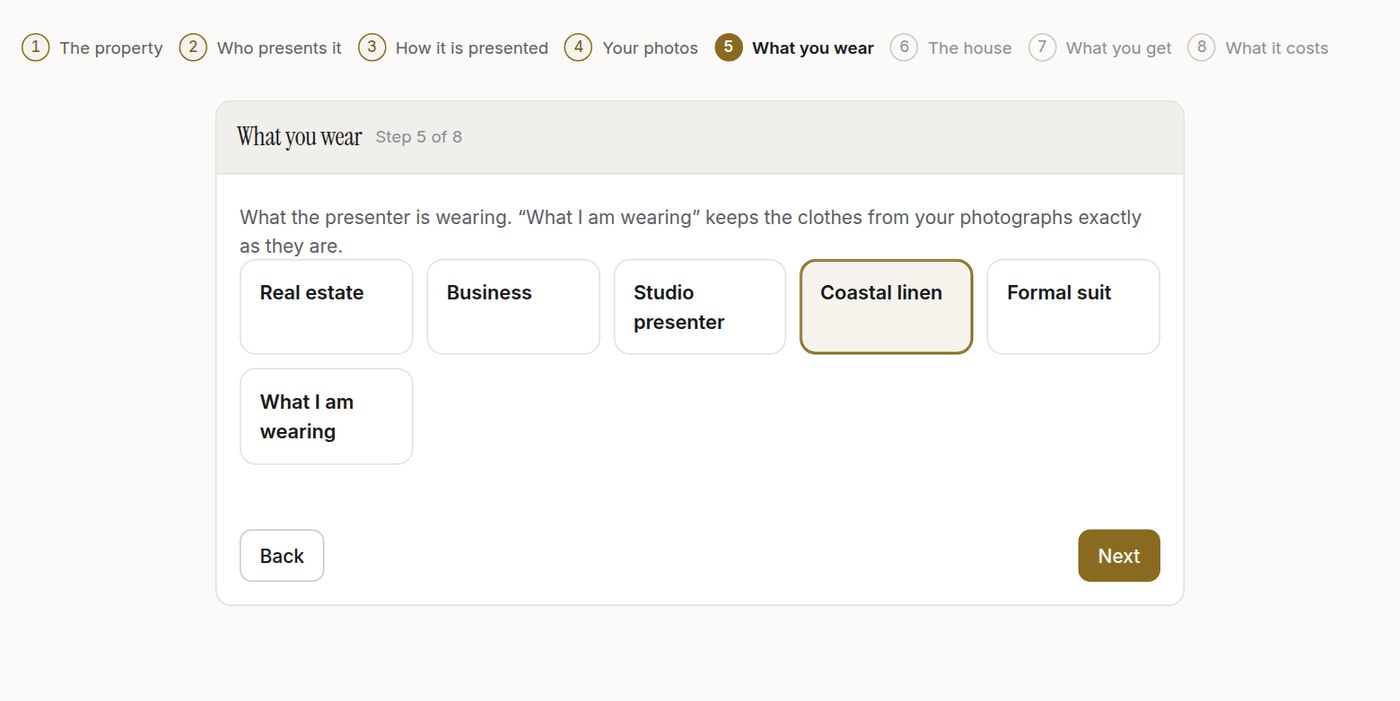
05What you wear Real estate, Business, Studio presenter, Coastal linen, Formal suit — or exactly what you had on in the photographs.
- Five outfits
- Or your own clothes
-
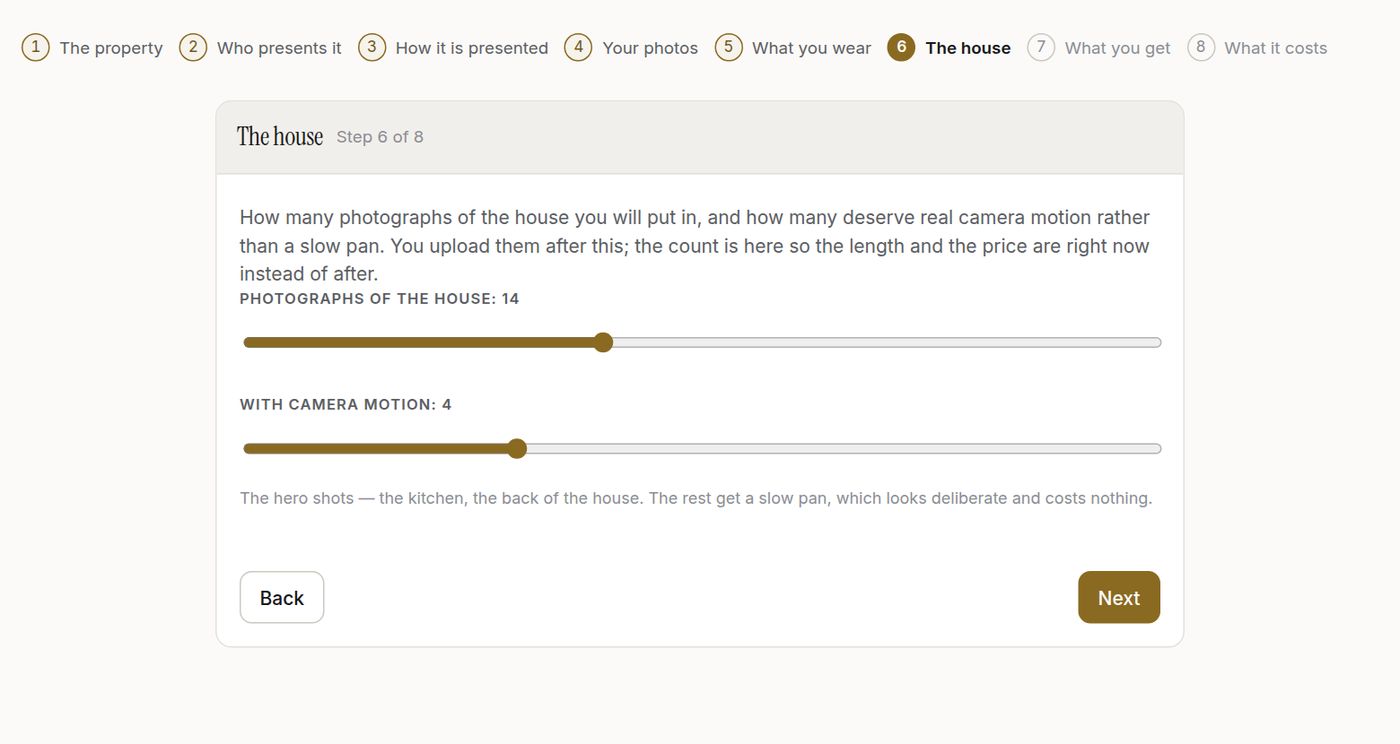
06The house How many photographs of the house go in, and how many of those deserve real camera motion rather than a slow pan. The count is here so the length and the price are right now, not after.
- Number of photographs
- How many get camera motion
-
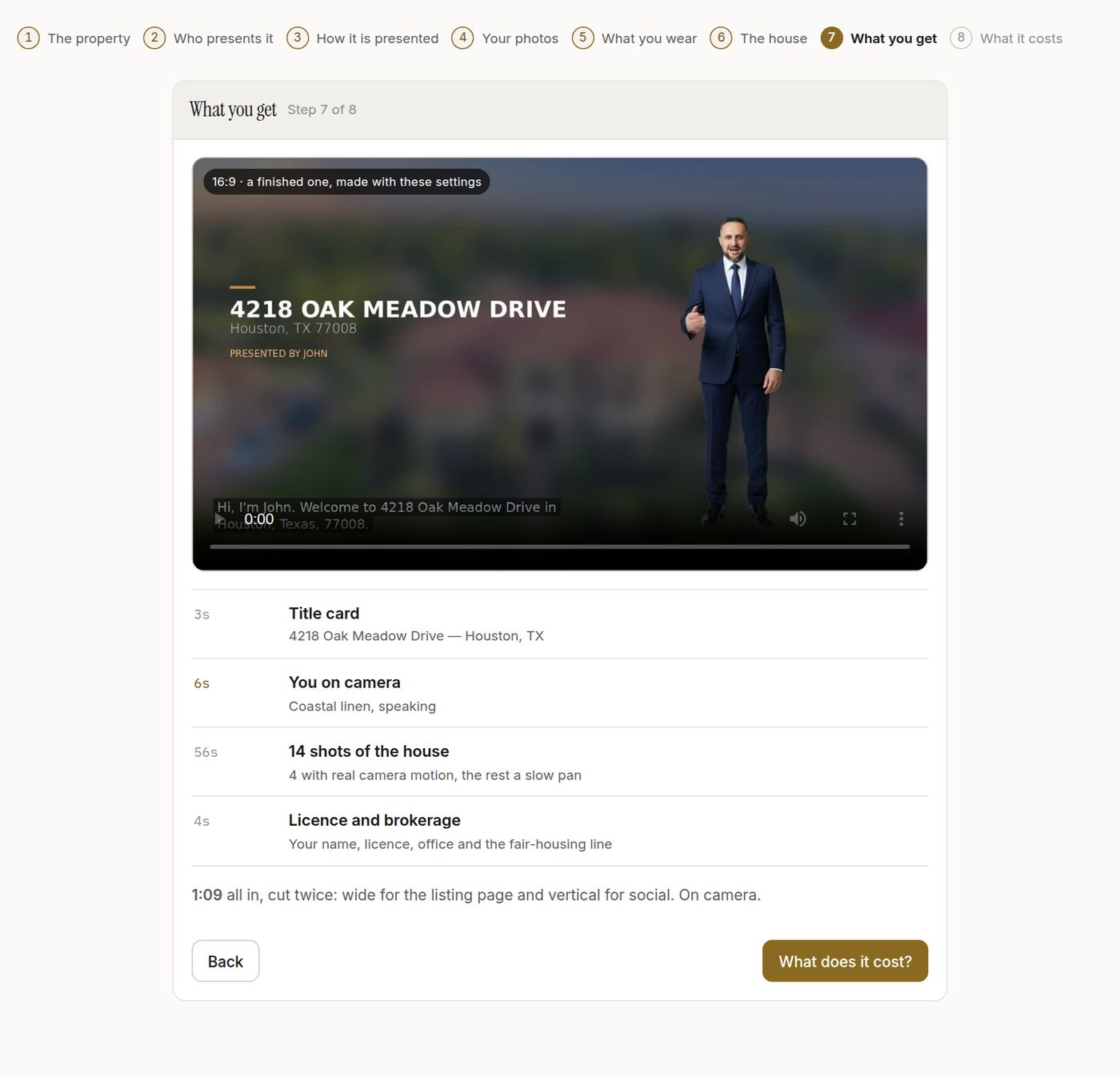
07What you get A finished video made with these exact settings, then the storyboard of yours: title card, the presenter’s opening beat, every shot of the house, and the licence card at the end.
- Watch a real one first
- See the beats and the running time
-
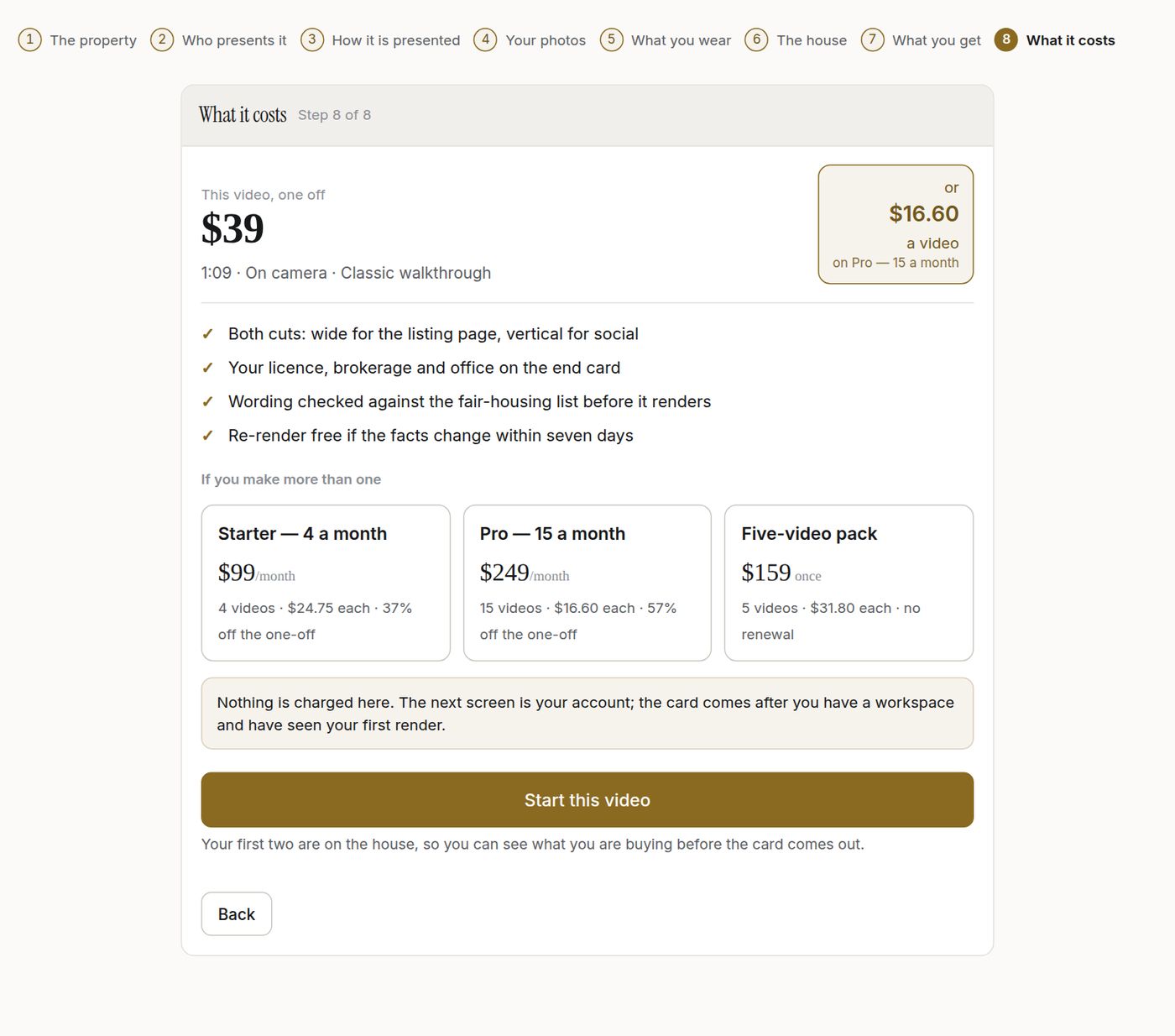
08What it costs The one-off price and what the same video works out to on each plan, side by side. Nothing is charged here; your first two are on the house.
- One video, a five-pack, or a monthly plan
- The per-video figure, shown
-

09Is this you? Before anything is animated you see the figure and say yes or no. Nothing about you goes on a listing until you have.
- Approve or reject the figure
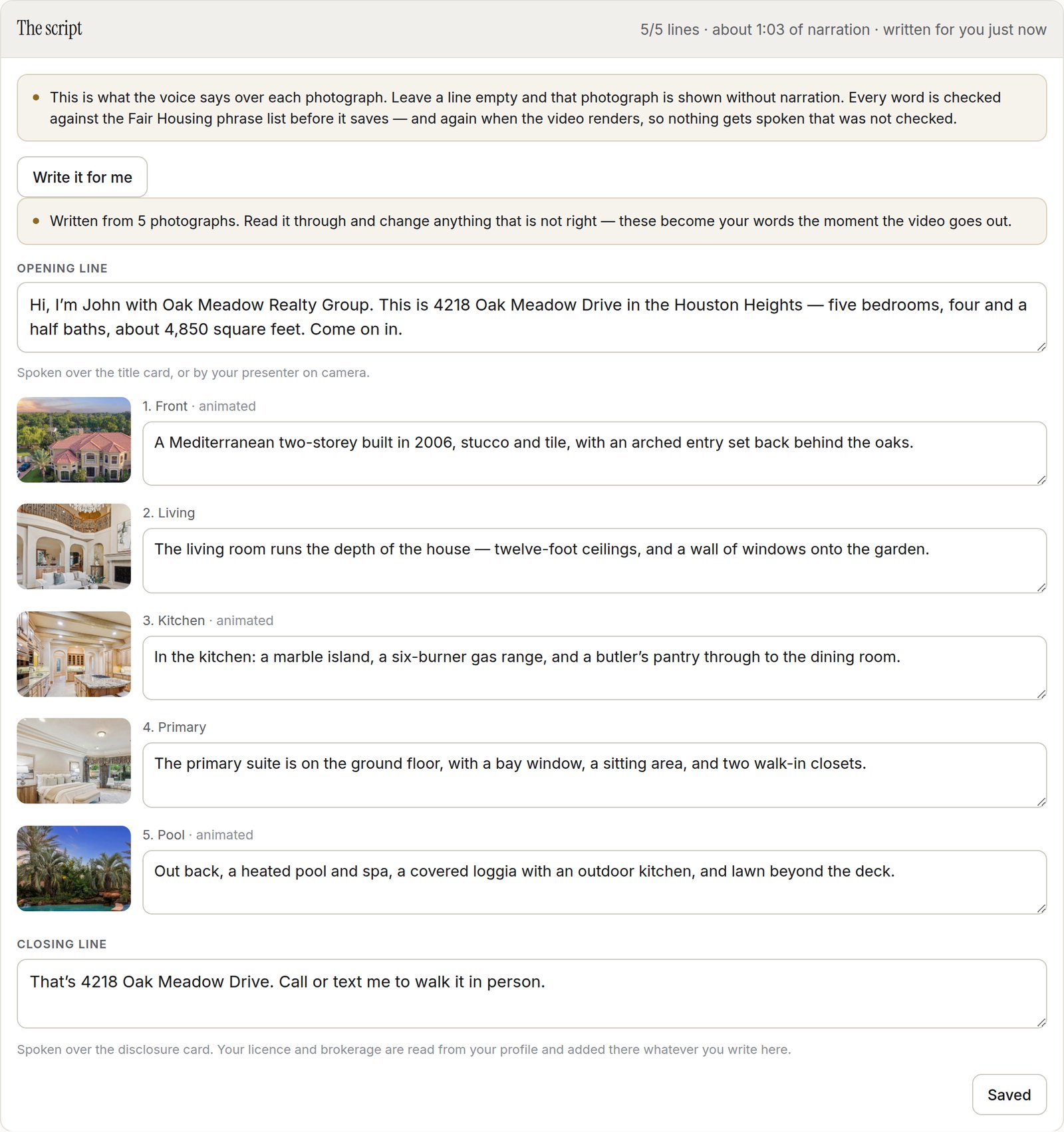
Press Write it for me and Tourline reads the actual photographs you uploaded and the facts you confirmed, then writes an opening line, a line for each room and a closing line. Every one is a text box you can rewrite — or ignore it and write the whole thing yourself. The script is checked against the Fair Housing phrase list before it will save, and checked again before a single second renders, so nothing reaches a buyer that was not checked. Then it is read aloud in the voice you picked, and every shot is held long enough to finish its sentence.
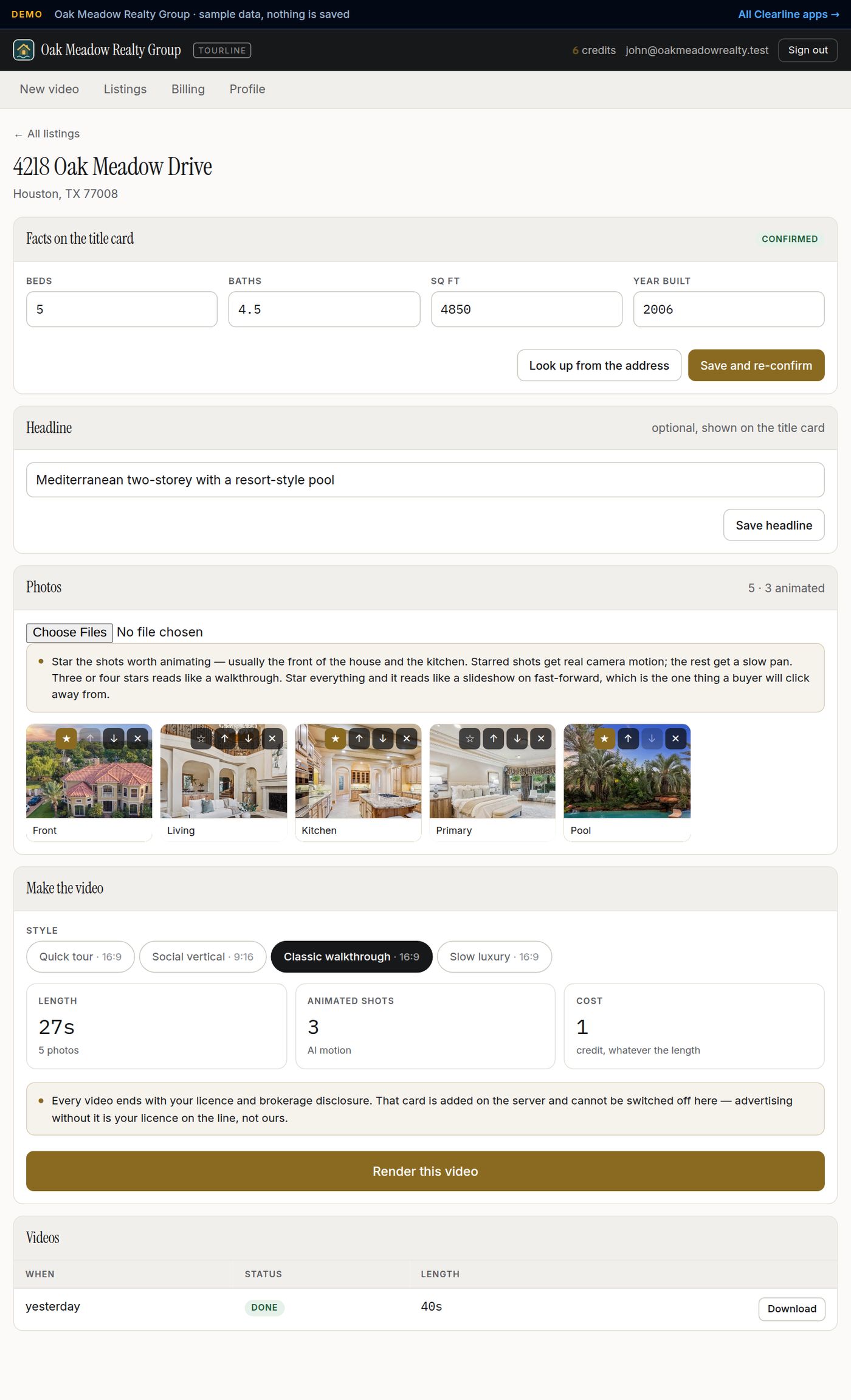
The confirmed facts, the headline, every photograph with its room label and its star, the style, and the button. This is the listing in the sample video, with its five rooms.
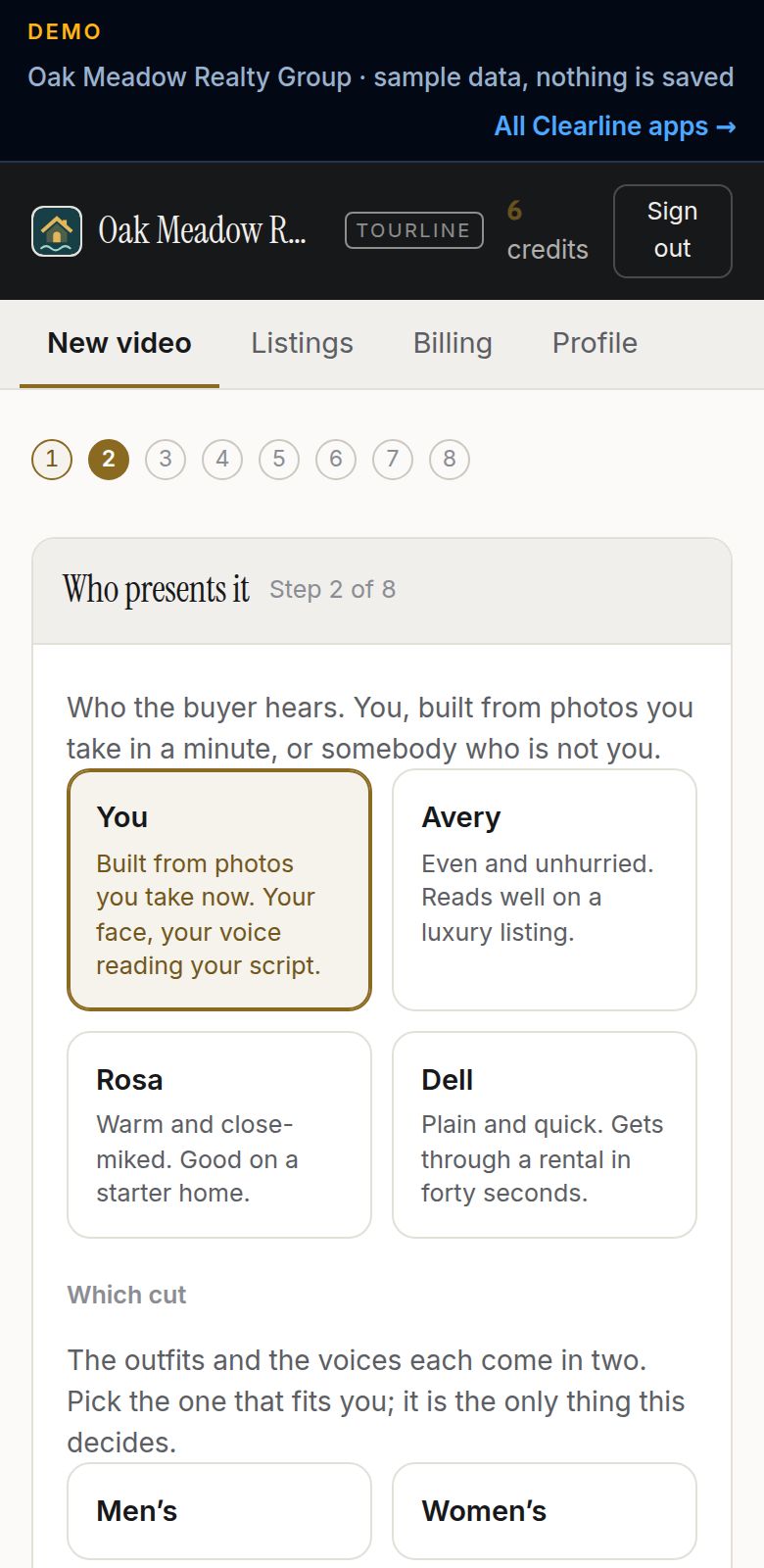
Every step fits a phone, because that is where the photographs are.
Six steps, and only three of them are yours.
The order is deliberate. Everything that can refuse a video — a missing licence line, an unconfirmed square footage, a phrase that breaks Fair Housing — happens before a single paid API is called, and a refusal leaves your credit where it was. You never pay for a video you are not allowed to publish.
- 01Say where it is
Address, then the facts Tourline looked up, confirmed by you. Two minutes.
- 02Say who presents it
On camera: you, from three photographs taken on the spot, or one of our presenters — then the cut, the voice and the outfit. Voice only: just the voice.
- 03Say how
On camera, voice only or captions only; then the pace and shape. Every one is the same price: one video, one credit.
- 04Watch one, then see the price
A finished video made with your settings plays before you are told a number. Then the one-off price next to every plan.
- 05Approve your figure
A still of you in the outfit, before anything is animated. Nothing goes on a listing until you say yes.
- 06It builds
Starred shots get camera motion, the rest a slow pan, your presenter speaks the opening, and the licence card closes it.
Same photos. Four different videos.
The template decides the shape of the frame and how long each photo holds. Change it and render again from the same photos — a vertical cut for Reels and a wide cut for the MLS are two credits, not two photo shoots.
Classic walkthrough
Four seconds a photo. The default, and the one that looks right on a listing page or a TV in the office.
Quick tour
Two and a half seconds a photo. Snappier, for a text message or an email where nobody watches past thirty seconds.
Social vertical
Three seconds a photo, full-height frame. Built for Reels, TikTok and Stories without cropping the house in half.
Slow luxury
Six seconds a photo. Let the shot breathe. For the listing where the photography was the budget.
You decide which shots get real motion.
Every photo moves — the question is how. Tap the star on a photo and that one gets real AI camera motion: a slow dolly across the kitchen counter, a push toward the front door. Everything else gets a smooth pan-and-zoom.
Starred — AI motion
The shot actually moves through the room, like a camera walked it. Generated per shot, from your photo, with a prompt written for that room. No furniture invented, no people added.
Unstarred — pan and zoom
A slow push in or out across the still, alternating direction so a run of them never looks mechanical. Indistinguishable from a proper slideshow.
It opens with the house and closes with your licence.
Two frames Tourline builds for you, from what you already typed. The end card is not optional and not a setting — the database will not produce a video without it, because advertising without your disclosure is your licence on the line, not ours.
One credit is one video.
You buy credits inside the app, on a card, and spend them one render at a time — no per-listing negotiation and nothing to cancel by phone. These are the plans Tourline ships with. Running it for a brokerage instead of yourself? Every price, credit count and plan name is a row in your own database, so you set them for your market before the first agent signs in.
- $39 a video
- No subscription, no expiry
- Buy another any time
- $31.80 a video
- Credits sit there until used
- No monthly commitment
- $24.75 a video
- Credits granted on each payment
- Cancel any time
- $16.60 a video
- Credits granted on each payment
- Cancel any time
What actually happens when you press buy.
Your card details never touch Tourline. You go to Stripe’s own hosted page, pay, and come back to a balance that went up by exactly the right amount — once, no matter how many times Stripe retries the notification.
You pick a plan and press buy
Tourline writes an order — numbered, with the price read from the plan row in the database, never from the browser — and asks Stripe for a checkout session.
Stripe collects your card
On Stripe’s own hosted page, under Stripe’s PCI scope. Apple Pay and Google Pay come along for free. A monthly plan becomes a real Stripe subscription; a one-off pack is a single payment.
Stripe tells Tourline it went through
A signed webhook, checked with a constant-time compare and a five-minute replay window. An unsigned or stale call is dropped.
Your credits appear — exactly once
The order flips to paid and the credits are added as ledger lines, both inside one transaction guarded against repeats. Stripe can send the same event five times; your balance still moves once.
The balance is a sum, not a counter
Every grant and every spend is a row you can read. The balance is what those rows add up to, which is why it can be explained line by line and can never quietly drift.
Renewals just work
Each month Stripe charges the subscription and sends another paid invoice; another grant lands in your balance. Cancel and the grants stop — credits you already bought stay spendable.
One location, real customers, no IT department.
Tourline is priced and built for a single business, and grows to a second location or a second chair when you do.
Businesses
Who uses it
The things we got right on purpose.
Small software still has to be correct. These are the rules the database enforces so the page never has to be trusted.
- Credits are a ledger, never a counter. — Spending locks the account row, reads the balance, then writes the debit — so two renders cannot both spend the last credit. Proved with twenty renders against one credit: exactly one ran.
- A credit is spent once, or not at all. — Credits are a ledger, not a counter, and spending one is a single conditional write. Two renders fired at the same instant cannot spend the same credit, and a render that fails puts it back.
- Validate first, then pay for generation. — The licence profile, the confirmed facts and the Fair Housing check all pass before any paid API is called. You never pay for a video you are not allowed to publish.
- Payments are recorded once. — Stripe can retry a webhook five times; the order is marked paid exactly once, and credits are granted exactly once.
- A render that dies gives the credit back. — If the renderer fails halfway, the render is marked failed and the credit is returned as its own ledger line — not quietly lost.
Your name on it, and a poster for the wall.
Every Tourline is set up as your business, not as ours. Two things come with it that you do not have to ask for.
A printable QR poster
A staff card for the office: one code your agents scan to sign in, with the app already chosen. There is no customer code, because the buyer watches the video, not an app.
- Staff code — the big one, since it is the only one. Your people scan it to sign in, with the app already chosen.
- Prints on a normal sheet; save it as a PDF and email it if you would rather.
- The codes point at clearlineprotocol.com, never at a server address, so a sheet taped to a wall keeps working if we move anything.
Your logo, your colour, your details
Send us your logo and we put it on the app and on the poster. Pick a colour and the buttons, badges and highlights take it. Your name, address, hours and phone are what your customers see — ours is not on the screen anywhere.
- Your mark in the header, and beside every one of your staff in the back office
- One accent colour, checked so text stays readable against it
- No logo yet? Your initials on your colour, which looks deliberate rather than missing
Click through it before you talk to anyone.
A live copy of Tourline with a sample business — Oak Meadow Realty Group. Everything works; nothing you do is saved.
Four more apps, same idea.
Order-Ahead
Customers order and pay ahead, pick a pickup time, and walk past the line.
02 · Trades & service fleetsStockroom
Know what is on the shelf, on every truck, and on every job — without a clipboard.
03 · AppointmentsBookline
Clients book themselves. The book never double-fills, and reminders go out on their own.
04 · RetailShopline
A small online store for a shop that sells real things — sizes, colours, shipping and all.
Run Tourline by next week.
Tell us the business, the hours, and what goes wrong today. We set it up, hand you the key, and you are taking it live the same day.
Get set upor email sales@clearlineprotocol.com